
Follow the steps below to permanently delete your account and associated user data from our platform.
Login to your account and open your dashboard screen after successful login.
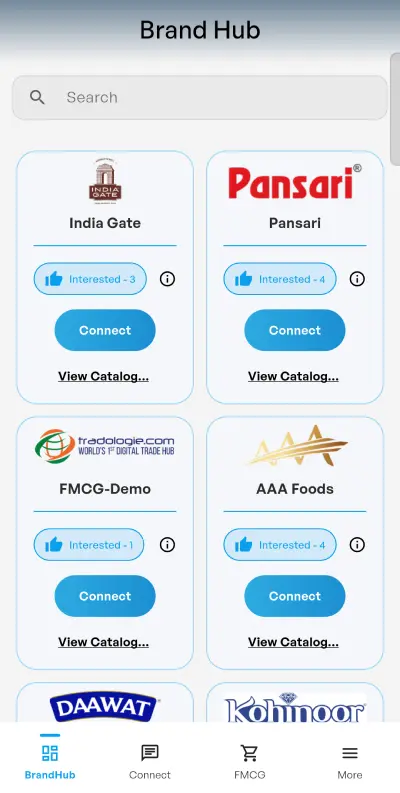
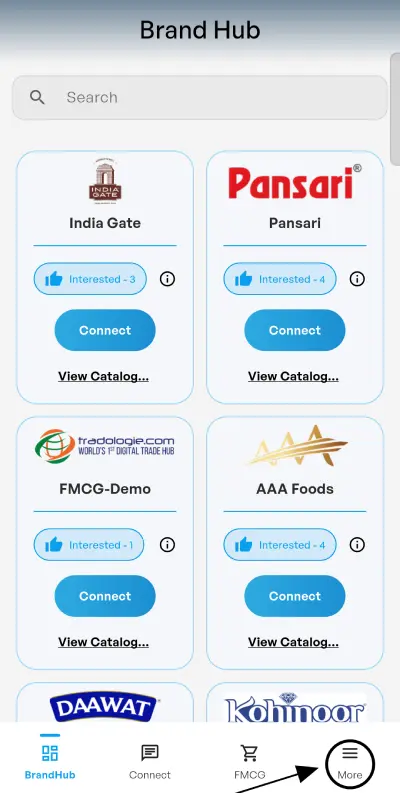
On the dashboard screen, click on the More option available in the menu section.
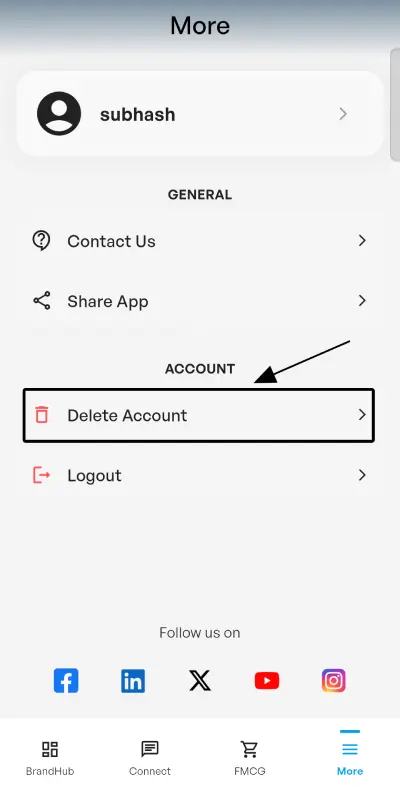
Inside the More section, click on the Delete Account option and confirm deletion.
Join a growing international trade ecosystem connecting buyers, exporters, and aspiring businesses across 70+ countries.

Verified Global

Lakh Crore Trade Facilitated

Countries Connected



Fill in your details and our team will get in touch with you.
We use cookies
We use cookies to enhance site functionality, improve user experience, analyze website performance, and deliver relevant content in accordance with our Cookie Policy.
We use cookies
Essential Cookies
Essential cookies are strictly necessary for Tradologie.com to operate properly. They enable core functionalities such as security, session management, network stability, and cookie consent preferences. These cookies do not collect personal data and cannot be disabled.
| Name | Vendor / Service | Purpose | Expiry | Privacy Policy |
|---|---|---|---|---|
| ASP.NET_SessionId | Tradologie.com / ASP.NET | Maintains secure user session across pages. | Session | https://privacy.microsoft.com/ |
| __RequestVerificationToken | Tradologie.com | CSRF protection for forms. | Session | https://www.tradologie.com/privacy-policy/ |
| cookie_consent | Tradologie.com | Stores consent preferences so the banner does not reappear. | 1 year | https://www.tradologie.com/privacy-policy/ |
| lang_pref | Tradologie.com | Stores preferred language. | 6 months | https://www.tradologie.com/privacy-policy/ |
| cf_clearance | Cloudflare | Confirms visitor passed bot checks; protects site. | 1 year | https://www.cloudflare.com/privacypolicy/ |
| __cf_bm | Cloudflare | Distinguishes bots from humans. | 30 minutes | https://www.cloudflare.com/privacypolicy/ |
Analytics Cookies
We use analytics cookies to gather anonymous, aggregated information about how visitors interact with Tradologie.com. This helps us improve the site, measure the success of content and services, and prioritize performance fixes.
| Name | Vendor / Service | Purpose | Expiry | Privacy Policy |
|---|---|---|---|---|
| _ga, _gid, _gat | Google Analytics (GA4) | Measure sessions, users, and pageviews. | 2 years / 24 hours / 1 minute | https://policies.google.com/privacy |
| _clck, _clsk | Microsoft Clarity | Records anonymized clicks, scrolls and sessions to improve UX. | 1 year / 1 day | https://privacy.microsoft.com/clarity |
| _pk_id.*, _pk_ses.* | Piwik PRO | Tracks sessions and returning users. | 13 months / 30 minutes | https://piwik.pro/privacy-policy/ |
| mf_user, mf_* | Mouseflow | Heatmaps and anonymous session replays for UX analysis. | 3 months / Session | https://mouseflow.com/privacy/ |
| stg_fired_* | CookieInformation / Tag Manager | Records tag firing events and campaign measurement. | Session | https://cookieinformation.com/privacy-policy/ |
| _clsk | Microsoft Clarity | Session aggregation for statistical reporting. | 1 day | https://privacy.microsoft.com/clarity |
| mf_user | Mouseflow | Aggregated session identifiers for reporting. | 3 months | https://mouseflow.com/privacy/ |
Functional Cookies
Functional cookies allow the website to provide enhanced usability and personalization. They store preferences such as language, region, chat settings, and login details for a smoother browsing experience. Disabling these cookies may limit certain features.
| Name | Vendor / Service | Purpose | Expiry | Privacy Policy |
|---|---|---|---|---|
| user_lang / lang | Tradologie.com | Remembers chosen language. | 1 year | https://www.tradologie.com/privacy-policy/ |
| timezone_pref | Tradologie.com | Stores timezone preference for display. | 6 months | https://www.tradologie.com/privacy-policy/ |
| remember_user | Tradologie.com | Keeps logged-in state when chosen. | 30 days | https://www.tradologie.com/privacy-policy/ |
| livechat_session | Tawk.to | Maintains chat session state. | Session | https://www.tawk.to/privacy-policy/ |
Marketing
Marketing cookies are used to deliver advertising that is relevant to you and to measure the effectiveness of our marketing campaigns across platforms such as Google, LinkedIn, Meta and Microsoft. These cookies are set only with your consent.
| Name | Vendor / Service | Purpose | Expiry | Privacy Policy |
|---|---|---|---|---|
| IDE, test_cookie | Google / DoubleClick | Ad delivery, frequency capping, remarketing. | 1 year | https://policies.google.com/technologies/ads |
| _gcl_au, _gcl_aw, _gcl_dc | Google Ads | Conversion tracking and ad click linking. | 3 months / 90 days | https://policies.google.com/privacy |
| 1P_JAR, NID, ANID, AEC | Personalization and ad preferences. | 30 days / 6 months / 13 months | https://policies.google.com/privacy | |
| YSC, VISITOR_INFO1_LIVE | YouTube (Google) | Tracks video engagement and ad metrics for embedded videos. | Session / 6 months | https://policies.google.com/privacy |
| _fbp, fr | Meta / Facebook Pixel | Targeting and conversion measurement for Facebook/Instagram ads. | 3 months | https://www.facebook.com/policy.php |
| li_gc | Stores cookie consent flag for LinkedIn services. | 6 months | https://www.linkedin.com/legal/privacy-policy | |
| li_sugr | LinkedIn Ads | Store cookie match of a user's identity for ads/retargeting. | 90 days | https://business.linkedin.com/marketing-solutions/ads |
| bcookie, lidc, UserMatchHistory, AnalyticsSyncHistory | LinkedIn Insight Tag | Advertising analytics, retargeting, and audience matching. | 1 month - 2 years | https://www.linkedin.com/legal/cookie-policy |
| _uetsid, _uetvid | Microsoft Ads (Bing) | Remarketing and ad performance tracking on Microsoft network. | 1 day / 13 months | https://privacy.microsoft.com/advertising |